Philip Johnson has been a software developer since 1983 and has been involved with Abraquest since 2004. He is the director of Spherical Software Limited (www.sphericalsoftware.com), the company that owns Abraquest.

Backup Error Messages?
If you experience an error message while trying to backup Abraquest we have a solution that you may not have heard about.
If you get the message "Cannot open the database exclusively", its one of two options:
- Another Abraquest user has the database open.
- It might be something on your PC (Anti Virus) thats active just at the wrong time.
There is an option you can try:-
- Login to System Admin in Abraquest
- Go to the Base Data Menu
- Click Configuration Options.
- Look for the checkbox that says "Use New Version?"
- Press Edit, click this and then press Save.
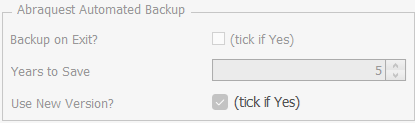
That's it, give that a try and always feel free to email support if you have any questions or issues.
We are always happy to hear from you.
About the author

comments powered by Disqus
Speak to an expert
Book a free demo
Book a free no obligation demo today! Our experienced consultant will answer all the questions you have and explain in clear english how Abraquest can help you.